Registrar · DNS · mail wiring · one conversation

Buy the name.
We write everything it points to.

Your AI searches live registry availability and quotes you both numbers — what it costs now and what it renews at. The purchase happens on a browser approval only you can pay. Then the same conversation writes the zone: your app on the apex, outbound mail with its own DKIM key, inbound mail arriving.

what you type“I need baysidebakery.com for the bakery, and I need to send and receive mail on it.”
Registry cost + $4, per transaction · works on domains you already own · $15/mo or $150/yr · two months free yearly
baysidebakery.com zone registeringactive
NS@two nameservers, issued when the zone is createdmanaged
AAAA@proxied → your deployed appmanaged
CNAMEwww→ apexmanaged
TXT@v=spf1 include:_spf.parsons.ai ~allmanaged
TXTparsons._domainkeyv=DKIM1; k=rsa; p=MIIBIjANBgkqh…managed
TXTbouncebounce-path authorisationmanaged
MX@10 → Parsons mail (inbound + catch-all route)managed
route@ / *→ the app you deployed, on the apex and wwwmanaged
Every row carries a lock: the service owns that record and set_dns_record refuses to touch it. The zone is written straight away — registration itself is not instant, taking about 10–15 minutes to settle before it flips from registering to active on its own.
Why you are here

Two afternoons, and the email still broke.

You are not price-shopping. You are fear-shopping. You have done this before and you remember which parts hurt: the checkout that fills itself while you are not looking, and the DNS panel afterwards where a wrong value fails silently for a week.

The intro price was under a dollar. The renewal was twenty-two. The coupon was for new customers — and you were no longer one.
You un-ticked six add-ons at checkout and still got charged for one.
You moved the nameservers and mail stopped. Nobody told you the MX records don't come with you.
There isn't one correct SPF/DKIM/DMARC value. You just wanted mail to work.
Switching is painful enough — DNS changes, email disruption — that you just pay the bill. The friction is doing the selling, and you know it.
the usual way11 steps
01search for a name
02un-tick six add-ons
03checkout
04find the DNS panel
05paste the MX records
06paste the SPF record
07open the mail provider's DKIM docs
08paste the DKIM record
09wait
10discover that mail stopped
11search "MX records did not transfer"
what you were actually buyinga name and eight records
The turn

A cart can only show you a number. A tool call can withhold the purchase.

The usual way to buy a name is a shopping cart, and a cart's job is to complete. It can display the renewal price — on another page, in smaller type — and then complete anyway. Ours cannot. When the renewal is 1.5× the registration price or worse, register_domain refuses until the renewal figure has been said out loud and you have agreed to that number specifically.

what a cart does
yourname.coyear one$3.48
the same nameyear two$31.20
Add to cart
Registry prices. The second line is real and it is on a different page, if it is anywhere at all. The cart completes either way — that is what a cart is for.
what the tool call does
› search_domains name:"yourname.co" available true price registry $3.48 · term 1 yr renewsAt registry $31.20 ⚠ spread 9.0× · gate trips at 1.5× register_domain refused until the renewal figure is stated and agreed.
Register — blocked
And when it does go through, the browser approval page prints the renewal figure itself, rather than trusting the agent to have mentioned it.

Registration and renewal are different numbers on 365 of 815 TLDs, measured 2026-08-12. search_domains carries a separate renewsAt field for exactly that reason, and never describes a domain as costing its registration price per year.

Where the money happens

The AI never holds a card.

This is the objection worth answering properly, because “I let an AI buy things” should worry you. register_domain is structurally incapable of charging. It runs a preflight and then mints an approval link that is live for 30 minutes. The account owner opens it, signs in, and sees the price, the renewal figure and the term on a clickwrap before paying on-session with bank authentication. A member of your project can ask for a domain. Only the owner can pay for one.

lane 1 · chat
Your AI asks
register_domain with the name, the term and an answer to autoRenew — which is a required question, not a default.
lane 2 · the link
An approval link
Returned to the chat. It carries no payment ability of its own.
expires in30:00
lane 3 · your browser
You, signed in
Price · renewal · term on a clickwrap. You pay on-session, with 3-D Secure. The authorisation is taken but not captured.
chat track — it never sees a card, stores no payment method and cannot raise a charge. Nothing on this side of the diagram can move money.
money enters here
registrar accepted
The authorisation is captured. The domain goes to registering and becomes active on its own in about 10–15 minutes. A receipt is emailed.
registrar failed
The authorisation is cancelled. The error you get back says it in those words: you have NOT been charged. Nothing to claim, nothing to chase.

Before any purchase, an ICANN registrant contact must be on file for the project — one call, once. Retry safety is built into the idempotency key, so a retry after a refunded failure is a new charge and a same-attempt retry can never double-charge you.

register_domain · set_registrant_contact · preflight_domain
The price rule

Cost, plus four dollars. Per transaction, not per year.

We are not at cost, and we are not going to say we are. Here is the exact function instead. It is the same function that charges your card, imported by the price sheet so the two can never drift apart.

retail = ceil(cost × years + 4) − 0.01

Four dollars is a flat fee on the transaction, not on each year. A two-year block carries one four dollars, not two. Flip the toggle and watch the wholesale figure double while the fee does not.

Prices come live from the registry at search time — not from a cached table that is wrong by the time you approve.

worked exampleterm · 1 year
.com $14.99 registry $10.88 × 1 yr + $4.00 once
.ai $175.99 registry $85.60/yr × 2 yr — the registry's mandatory minimum term + $4.00 once
at renewal + $4.00 the same four dollars, on the registry's renewal price list. We never add a markup that only appears in year two.
What we cannot promise: that the registry will not move its own price. What we can do is make you hear its renewal number before you buy — and refuse the sale if the gap is wide and you have not.
.coregistry $3.48→ renews $31.209.0×
.feedbackregistry $9.99→ renews $321.2232×

Both rungs trip the gate. Neither can be sold to you until you have been told the second number and agreed to it.

Before you move anything

We will not silently kill your email.

preflight_domain reads public DNS over DoH and tells you what is already there — nameservers, web records, MX, SPF — and it names your current mail provider by brand rather than making you recognise a hostname.

It costs nothing, changes nothing, and needs no ownership. You can run it on a domain you have not bought yet, or on one you own somewhere else and are only thinking about moving. It is read-only, full stop.

The warnings come back worst-first, in plain English, and your AI reads them to you verbatim. add_existing_domain returns one embedded in its response — so the warning lands before the nameservers move, not after.

Google WorkspaceMicrosoft 365ZohoProtoniCloudFastmailImprovMXSquarespaceCloudflare Email Routing
› preflight_domain name:"example.com"read-only
NSns1.oldregistrar.example · ns2.oldregistrar.example
A198.51.100.24
AAAA2606:4700:3033::ac43:8f1e
MX10 aspmx.l.google.comGoogle Workspace
SPFv=spf1 include:_spf.google.com ~all

warnings · worst firstMoving the nameservers will stop delivery to Google Workspace until the MX records are re-created here.

Nothing in this call touches your zone, your registrar or your account. It is a DNS read that anyone could perform — we just read it properly and say what it means.

Already own the name

The 60-day lock doesn't apply to you.

The single most common reason people don't move: “I registered it three weeks ago, so I'm stuck for two months.” ICANN's 60-day lock blocks transfers. It has never blocked a nameserver change — and a nameserver change is all we need. add_existing_domain creates the zone here and hands you two nameservers. No registrar transfer happens. There is nothing to wait for.

day 3 · nameserver change
ICANN transfer lock — 60 days
day 0day 30day 60
Straight about this one: transfer-in is not built. Your registration stays exactly where it is and your registrar keeps billing you for it. We run the zone and the wiring. If you would rather we owned the registration too, buy the name here instead.
step 1Add the domain. You get two nameservers and an embedded preflight report in the same response.
step 2Set those nameservers at your current registrar. The one thing only you can do.
step 3A poller re-checks delegation until it confirms — usually minutes, occasionally up to 48 hours. check_domain tells you where it stands and re-checks on demand.
thenIdentical to a domain bought here: the same four planes, the same managed records, the same tools.
add_existing_domain · preflight_domain · check_domain · list_domains
The wiring

Four planes, one call each.

You do not edit records. You turn on a capability and every record that capability needs is written correctly, in one go — and comes back marked managed so that nobody, including you, can quietly break it later. Flip the switches and watch the zone fill.

zone · yourbusiness.com3 records
AAAA@proxied → your appmanaged
CNAMEwww→ apexmanaged
route@ / *→ the Deploy dispatchermanaged
Records a plane owns come back managed: true from list_dns_records, and set_dns_record refuses to touch them. Everything else on the zone stays yours to edit freely — A, AAAA, CNAME, TXT, MX, SRV, CAA and NS.

The ordering is real, not a UI nicety: email_sending before email_routing. Turn routing on first and the zone's MX writes lock — the bounce MX can never be added afterwards and outbound mail is permanently wrong. So the tool refuses, and prints why.

enable_service · provision_sending_dkim · list_dns_records · set_dns_record
The bit registrars never tell you

Burn a subdomain, not your business.

Bulk mail and campaign mail attract spam complaints. Complaints damage the sending reputation of the name they came from. If that name is the one your invoices, your password resets and your reply-to all use, a bad campaign takes those down with it.

So enable_service takes an optional host and the tool actively recommends using one for anything bulk. news.yourbusiness.com gets its own sending identity, its own DKIM key and its own reputation — while inheriting ownership and verification from the parent. No separate purchase. No separate verification.

Up to 25 hosts per domain.

enable_service host:"news" · provision_sending_dkim · list_dns_records
enable_service host:"news" yourbusiness.com invoices · password resets reply-to · the deployed app reputation: untouched news.yourbusiness.com the campaign spam complaint contained here

The bleed stops at the boundary because reputation is scoped to the sending host, and each host carries its own key.

Drive it from your AI

Every tool, grouped by the job.

Domains lives in the assistant you already talk to — Claude, ChatGPT, Cursor, anything that speaks MCP. There is no dashboard step in the middle, because the buying surface is the conversation. Every tool is gated to the project owner; register_domain and renew_domain also accept a project member, who can ask but cannot pay.

find
“Is anything good still available for a bakery in Pensacola?” — batch up to ten candidates in one call, or fan one word across a list of TLDs.
search_domainssuggest_domainspreflight_domain
buy
“Take it, two years, auto-renew on.” — an approval link comes back; you pay it in a browser.
register_domainset_registrant_contactadd_existing_domain
wire
“Put my app on it and turn on mail, sending and receiving.”
enable_serviceprovision_sending_dkimlist_dns_recordsset_dns_record
run
“What's expiring, and is the delegation still good?”
check_domainlist_domainsrenew_domainset_auto_renewsync_registrant_contact
leave
“Give me the auth code, I'm moving it.” — handed over on request, with no retention flow and no phone call.
get_transfer_codeset_transfer_lock
share
“Let the other project send as this domain.” — and nothing else.
share_domain_with_projectunshare_domain_with_projectlist_domain_shares
you › buy baysidebakery.com and set up mail on it
search_domainsavailable · price and renewsAt both quoted
set_registrant_contactrequired once, before any purchase
register_domainapproval link · live 30 min · only the owner can pay
→ registering, then active on its own in ~10–15 min
enable_servicewebsite · email_sending
provision_sending_dkimmint → publish → observe resolving → activate
enable_serviceemail_routing
list_dns_records8 records · 8 managed
one connection · minted for you at sign-inGET YOURS →

One domain, several of your projects. share_domain_with_project grants exactly one thing — send email as this name — and nothing else. No DNS access, no renewal, no transfer, no release, no new addresses. Revocable at any time, and only the owning project can grant it. So support@yourdomain.com can live in a different project from the one that owns the name.

When it goes wrong

The interesting question is who eats the failure.

Reassurance is worthless here, so this is machinery instead. Four real failure modes, what the system actually does, and what lands on your card.

what happenedwhat the system didwhat you were charged
The registration failed at the registrarThe uncaptured authorisation was cancelled. The error says you have NOT been charged.$0.00
The registrar leg of a renewal failedAuto-refunded in the same call, and the error text tells you whether the refund landed.$0.00
A refund did not landA cron retries owed refunds until they do. Nobody has to notice, and nobody has to file a ticket.refunded
Our prepaid registrar float ran dryThe registrar's own auto-renew was deliberately left on as a backstop, because the failure was ours.domain does not lapse

The renewal ladder, and its asymmetry

At T-50 days we charge you and renew. At T-40, if it is still unpaid, we disable the registrar's own auto-renew — but only when the failure was tagged as a payment failure, i.e. you didn't pay. If the failure was ours, or could not be classified, the backstop stays on and the domain renews anyway. We take the loss rather than let your name lapse.

We will never sell your renewal

We buy from the registrar out of a prepaid balance. Before any new sale, the float is checked against every renewal already promised — and the new sale is refused if taking it would eat money that belongs to somebody's renewal. Renewals themselves never consult that reserve. The queue runs in the right order on purpose.

Renewals price from the registry's renewal price list, plus the same flat $4. That was broken once and fixed on 2026-08-22, proven with a live charge: $14.99 taken, statement descriptor PARSONS.AI, registrar renewed, expiry moved 2027 → 2028, receipt emailed.

The printed ledger

What we do, and what we don't.

A page with no right-hand column is marketing, not documentation. So here is ours, printed at the same size as the left — because you will find all of it anyway, and it is better that you find it now than at the end of a form.

we do
  • Sell 26 TLDs at registry cost plus a flat $4 per transaction.
  • Quote the renewal figure alongside the price, always, and refuse the sale when the gap is wide and you haven't agreed to it.
  • Run the zone and write all four planes — website, email sending, DKIM, email routing.
  • Take domains you already own, by delegation, during the 60-day lock.
  • Hand over the EPP transfer code on request, with no retention flow. A domain you can't leave with is a hostage.
  • Refund automatically when our side of a purchase or renewal fails.
  • Release registrar holds and retract DKIM keys before deleting anything, so a closed project can never leave an invisible recurring charge or a stranded claim on the name.
we don't
  • Transfer-in is not built. Bring the domain by delegation, or buy it here.
  • We are not at cost. Registry cost plus four dollars, printed above.
  • Sell every TLD there is — twenty-six, listed below. If yours isn't one of them, search_domains says not sellable here rather than pretending it's taken.
  • Sell premium or non-standard-tier names — those are refused.
  • Give you WHOIS privacy where the registry forbids it. 20 registries do, including .ai. Every search result carries privacySupported, so you know before you buy, not after.
  • Register instantly. About 10–15 minutes to settle; delegation for a brought-in domain is minutes, occasionally up to 48 hours.
  • Chase ICANN's registrant-email verification for you. If the link isn't clicked by its deadline the domain can be suspended — the deadline is printed on every read and in the console.
purchasable today · 26com net org dev app shop io ai co xyz info cc online site live cloud email studio news space blog life family world academy icu

Yes — .io, .ai and .co are all sellable here, on the same registry-cost-plus-$4 rule as the rest of the list.

10 domains per project5 purchases / day3 manual renewals / day25 hosts per domain10-year cumulative term ceilingregistrant contact required before any purchase
The console

Observe here. Act in chat.

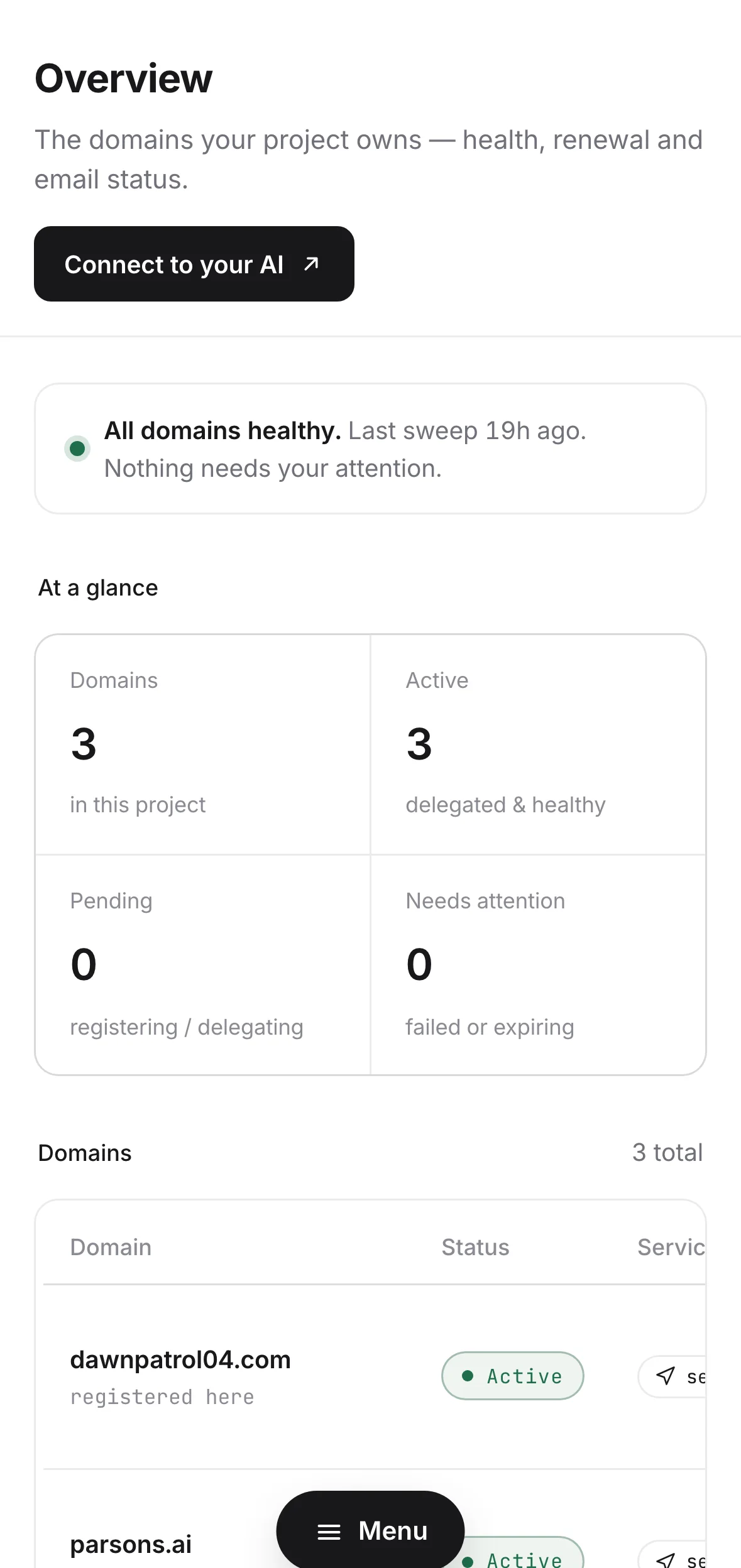
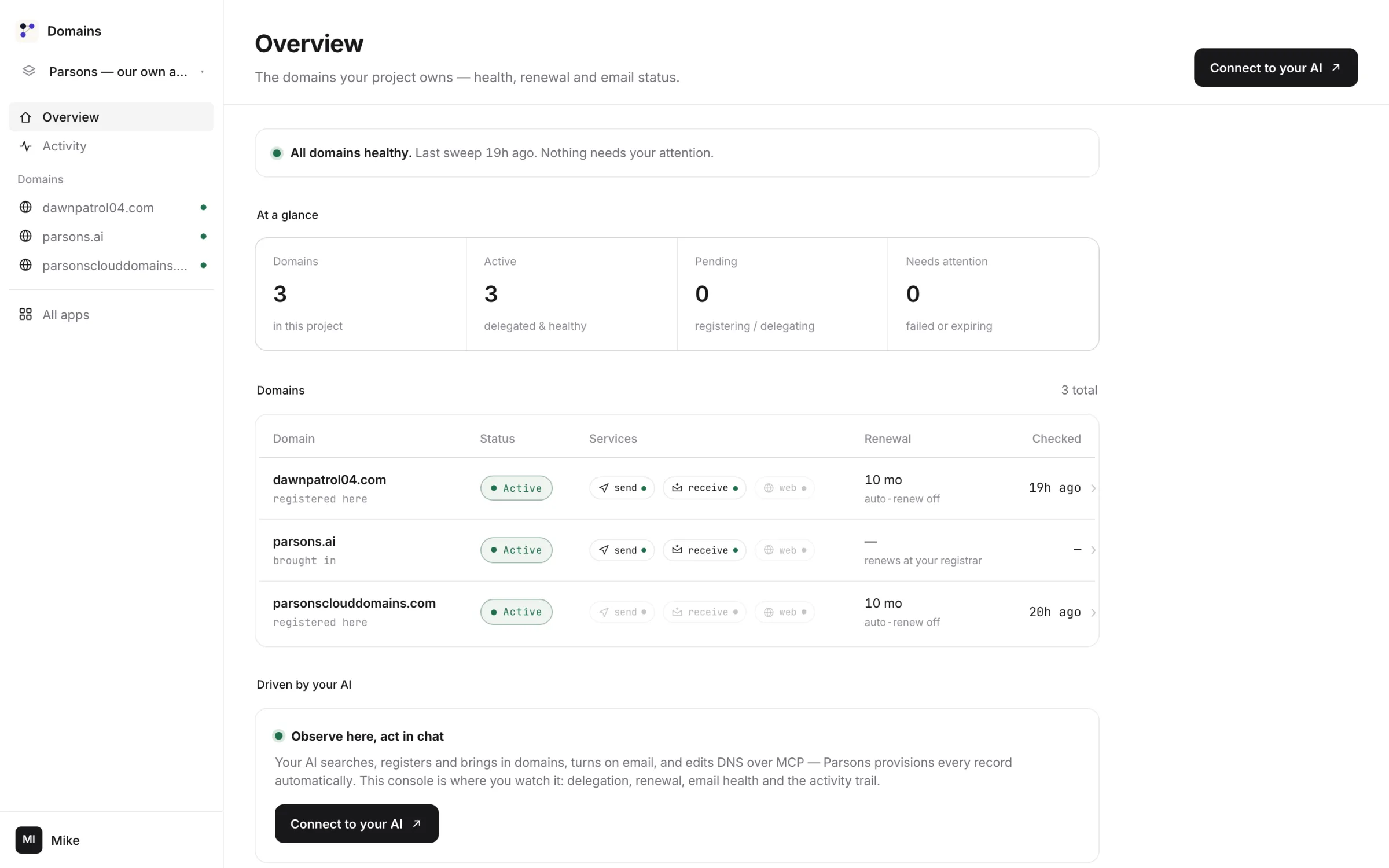
This is deliberate, and it is the opposite of what most product pages claim about their dashboard. The console at /app is read-only, with exactly one action on it: Check now. You cannot register, add, wire or edit DNS from it — all of that lives in the tools.

What it is for is the question you actually have at 11pm: is anything wrong? Delegation status, the expiry and auto-renew truth, a health dot per mail plane, the DNS table with its managed locks, and the activity trail of every call that touched the zone.

It is part of your subscription, so it sits behind the same paywall as everything else. It is a trust surface, not a store.

domains.parsons.ai / app
All domains healthy — nothing needs your attention
baysidebakery.com active · delegated expires 2028-08-22 · auto-renew on
email_sending email_routing dkim website
dns · 8 records · 8 managed
TXTparsons._domainkeymanaged
MX@ · 10 → Parsons mailmanaged
AAAA@ · proxied → your appmanaged
activity
14:02enable_service · email_routingok
13:58provision_sending_dkim · activateok
13:51register_domain · capturedok
Check nowthe only button on the page
Pricing

One plan. It includes every other Parsons product.

Monthly or yearly, your choice at checkout — pay for the year and two months are free. No seats, no enterprise tier, no free tier. Past an included allowance, the extra draws from prepaid credits at roughly wholesale-plus-half — building stays free inside the numbers, and the bill starts when real usage does. The domain itself is a separate, one-time charge — it never becomes a subscription line you forget about.

Base
$15 / month
or $150 / year$180 paid monthly — two months free
mail sent from your domain200 / day
traffic to your app on it1,000,000 req
included every month · past them, prepaid credits
  • Every domain tool — the surface is not tiered
  • All four planes on every domain, and on subdomains
  • 10 domains per project — an anti-abuse ceiling, not an upsell
  • App storage 1 GB · object storage 5 GB · 10,000,000 CPU-ms
  • Every other Parsons product, same login

And also, on the same subscription.

These are account-wide, not Domains-specific. The bottom four are metered and deliberately never limited, because they do not drive our cost — so their limit column has no number in it at all.

included with the subscriptionallowance
Projects — each with its own data, members and spend capsunlimited
Outbound email200 / day
Object storage5 GB
MCP tool calls — every product, every toolno limit
Monthly active users on Authno limit
Apps deployedno limit
Databases createdno limit

Projects are unlimited, and included.

One for the business, one for the client, one for the thing you are not sure about yet — each with its own domains, its own data, its own members and its own spend caps, at no extra cost. Three businesses is three projects, not three subscriptions. There is nothing to upgrade to and there are no seats to buy.

The domain is not a subscription line.

It is a one-time charge per term — registry cost + $4, approved by you in a browser, on a page that prints the renewal figure. It does not sit inside the $15 and it does not renew silently: set_auto_renew is an explicit answer you give at purchase, changeable at any time in either direction. A .com is $14.99. A .ai, on the registry's mandatory two-year block, is $175.99.

14-day free trial on your first subscription · billed monthly or yearly · cancel any time

The fair question

Is it worth fifteen dollars a month?

That is the honest question at this price, and it deserves figures rather than adjectives. Here is what the same money buys elsewhere, what we deliberately do not charge for, and where a specialist tool genuinely beats us.

One app's price, twenty-two products.

Most people reading this already pay $15 or more, every month, for a single one of these things. A CRM on its own runs $48–$99/mo at HubSpot, Pipedrive or Attio; hosted auth at 100,000 monthly users is roughly $1,025/mo at Clerk. Base is $15 for the registrar and DNS plane, the mail plane, auth, database, object storage, deploy, scheduler, CRM and the rest — one login, one bill, one place the wiring already matches.

Per app, a specialist can be cheaper. We would rather say it.

If you want exactly one of these things and nothing else, a single-purpose tool may cost less than $15 — an issue tracker from $8/seat, a personal-finance app at $13/mo. We are not going to claim otherwise on a page you can fact-check in a browser tab. Against the bundle, though, nothing is close: buying these separately is six or seven subscriptions and none of them know about each other.

Nothing per seat, per workspace or per project.

Projects are unlimited and included — three businesses is three projects, not three subscriptions. Members carry no price, monthly active users on Auth are uncapped, MCP tool calls are uncapped. The figure on the card is the whole subscription figure. The usual way a $15 plan quietly becomes $90 is seats and workspaces, and neither exists here.

The subscription is access. Consumption is prepaid, capped and separate.

The $15 buys the tools, the zone and the wiring — the domain itself is bought separately and visibly, at a printed formula, on your own on-session approval. What genuinely costs per unit sits on a prepaid wallet with its own ceiling: AI at provider cost × 1.5, voice at $0.03/min, an outbound SMS segment at $0.02. Nothing draws down that you did not put there, and anything recurring we buy on your behalf — a US phone number at $3.99/mo, a domain renewal — is a separate line you approved.

Questions people actually ask

Before you say the name.

Will moving my nameservers break my email?

Run preflight_domain first — it reads public DNS and names your current provider by brand, then warns you worst-first. Then enable_service email_routing re-creates the MX records here. The warning arrives before the move, not after it.

Can I bring a domain I registered two weeks ago?

Yes. ICANN's 60-day lock blocks transfers, not nameserver changes, and a nameserver change is all we need. add_existing_domain creates the zone and hands you two nameservers. No transfer happens.

Can I transfer a domain in?

Not yet — it is genuinely not built. Bring it by delegation, or buy the name here. We would rather say this than let you find out at the end of a form.

What happens at renewal?

Charged at T-50 days from the registry's renewal price list, plus the same flat $4. If the registrar leg fails you are auto-refunded. If the failure is ours, the registrar's own auto-renew is left on so the domain does not lapse.

Can I leave?

get_transfer_code hands over the EPP auth code on request. No retention flow, no phone call, no delay we control. set_transfer_lock is yours to set or clear in either direction.

Does the AI have my card?

No. register_domain cannot charge at all. It mints an approval link that is live for 30 minutes; the account owner opens it, signs in, sees price, renewal and term on a clickwrap, and pays on-session with 3-D Secure. A project member can ask for a domain and cannot pay for one.

Is .ai available?

Yes, on the registry's mandatory two-year term: $175.99 for the block, from $85.60/yr wholesale. Note that the .ai registry forbids WHOIS privacy — we cannot give it to you there, and the search result says so before you buy.

Do I get free WHOIS privacy?

Wherever the registry permits it, yes, at no charge. 20 registries forbid it — including .ai, .us, .uk, .de, .fr and .ca. Every result carries privacySupported so this is never a surprise.

What if I have three businesses?

Three projects. Each with its own domains, data, members and spend caps — and projects are unlimited and free. One subscription, one login.

Is there a yearly price?

Yes — $150/yr, against $180 if you pay by the month. That is two months free, and you pick the interval at checkout. Nothing about the plan changes: same allowances, same products, same unlimited projects.

Does the free trial take a card?

Yes. It is a Stripe Checkout subscription with 14 trial days, and Checkout collects a payment method. Cancel any time inside the trial and you are not charged. The trial is first-subscription-only.

Can I use a subdomain?

Yes, and for bulk or campaign mail you should — enable_service host:"news". It inherits ownership and verification from the parent, gets its own DKIM key and its own sending reputation, and needs no separate purchase. Up to 25 hosts per domain.

What if I delete the project?

Registrar holds are released and DKIM keys are retracted before anything is deleted — so a closed project can never leave an invisible recurring charge, or a stranded ownership claim that burns the name for whoever gets it next.

Say the name. The rest is wiring.

One conversation buys it, one conversation wires it, and the approval that spends the money happens in your browser, under your own sign-in.

baysidebakery.com zone active
AAAA@proxied → your appmanaged
TXT@v=spf1 include:_spf.parsons.ai ~allmanaged
TXTparsons._domainkeyv=DKIM1; k=rsa; p=MIIBIjANBgkqh…managed
MX@10 → Parsons mailmanaged
8 records · 8 managed · sending, routing, DKIM and website all green.
$15/mo or $150/yr · 14-day free trial, cancel any time · domains at registry cost + $4